What Does Client Intake Mean for Service Providers?
Discover what client intake means for service providers and learn how a streamlined process enhances client engagement and efficiency.

What Does Client Intake Mean for Service Providers?

Client intake is the structured process of collecting essential information from a new client before service delivery begins. It qualifies prospects, captures project context, and gives your team everything needed to start work without chasing details later. For service providers in beauty, wellness, legal, therapy, and photography, a well-run client intake process is the difference between a smooth first impression and a frustrating one. This article breaks down the client intake definition, how it works across industries, and how to build a process that reduces friction from day one.
What does client intake mean, and what data does it collect?
Client intake is the systematic gathering of key client data before a service engagement begins. Intake forms typically capture contact information, project goals, budgets, deadlines, and specialized fields like medical history or legal conflict data. That range of data points reflects how much the process varies by industry.
Here is what a complete intake form covers across most service businesses:
- Contact details: Full name, email address, phone number, and preferred communication method
- Service or project context: What the client needs, their goals, and any relevant background
- Budget and timeline: Expected spend range and target completion dates
- Industry-specific fields: For estheticians, this means contraindications and skin sensitivities. For attorneys, it means case type and conflict checks. For therapists, it means presenting concerns and insurance information.
- Referral source: How the client found you, which informs marketing decisions
Collecting this information upfront eliminates the back-and-forth that slows down early client relationships. Your team arrives at the first meeting prepared, not guessing. That preparation signals professionalism and builds trust before any work begins.
Pro Tip: Add a single open-text field at the end of your intake form asking “Is there anything else we should know?” You will be surprised how often clients share critical context they would not have offered in a structured question.

How does a client intake workflow operate step by step?
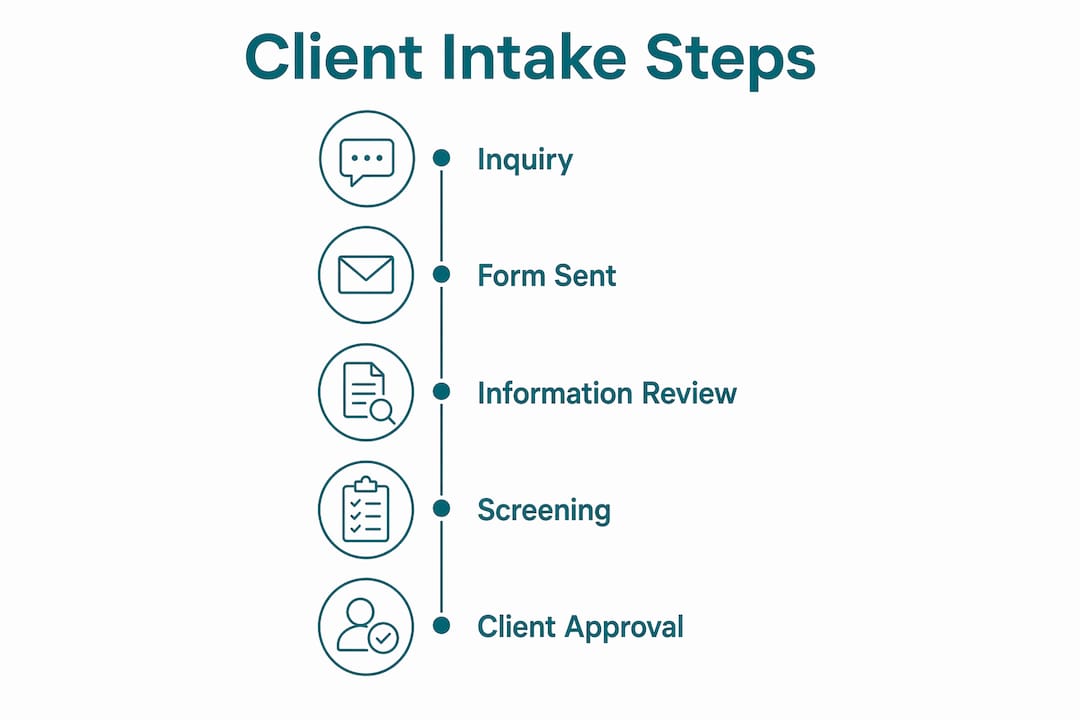
A practical client intake process follows a repeatable sequence that moves a new inquiry from first contact to a confirmed, prepared engagement. A well-designed workflow includes a welcome trigger, a short initial form, set deadlines, automated reminders, a submission review within 24 hours, and a kickoff call with a written recap.
Here is how that sequence looks in practice:
- Trigger a welcome. When a new inquiry arrives, send an automated welcome message that sets expectations and includes a link to your intake form.
- Send a short form. Limit your initial form to 5–10 essential questions. Asking for too much too early is the primary cause of client drop-off.
- Set a deadline and reminder. Give the client 48–72 hours to complete the form. Schedule one automated reminder at the halfway point.
- Review within 24 hours. Once the form is submitted, review submissions promptly and follow up only on blocking issues, not every minor gap.
- Conduct a kickoff call. Use the intake data to run a focused first meeting. Confirm expectations, clarify any ambiguities, and send a written recap the same day.
The workflow differs by sector. In therapy, sending electronic intake paperwork before the first session reduces onsite administrative burden and allows the clinician to focus the session on assessment rather than form-filling. In legal practice, the intake sequence includes a conflict check before any substantive conversation begins. In beauty and wellness, the intake form captures contraindications and patch test history before a single service is booked.
Pro Tip: Build your intake workflow inside a CRM or digital form platform so that every step, from the welcome email to the kickoff recap, runs automatically. Manual tracking creates gaps and delays that erode the client experience before it starts.
How is client intake different from client onboarding?
Client intake and client onboarding are related but distinct phases. Confusing them leads to real problems: either you ask for too much information before a client has committed, or you start onboarding someone who was never properly qualified.
The table below shows the core differences:
| Phase | Focus | Timing | Key Actions |
|---|---|---|---|
| Client Intake | Qualification and screening | Before commitment | Collect basic info, assess fit, run conflict checks |
| Client Onboarding | Engagement setup and case start | After commitment | Sign agreements, collect documents, set up project |
Intake focuses on qualification and screening, while onboarding manages the formal commitment and case setup. In legal services, this distinction is especially high-stakes. An attorney who skips a proper intake and jumps straight to onboarding risks taking on a client with a conflict of interest or an unwinnable case. In therapy, intake determines whether a clinician is the right fit for a client’s presenting concerns before any treatment plan is discussed.
For general service businesses, the practical risk is different but equally real. Blurring intake and onboarding leads to over-asking early, which drives away prospects, or under-qualifying, which wastes time on clients who were never a good fit. Keeping these phases separate protects both your time and your client’s experience.
The cleanest way to maintain the boundary: intake ends when a client says yes. Onboarding begins the moment they do.
What tools and best practices improve client intake effectiveness?
The right tools turn a manual, inconsistent intake process into a reliable, repeatable system. Well-designed online intake workflows replace scattered administration with digital paths that include form submission, automation, scheduling, file sharing, agreement signing, payment, and project setup.
Here are the practices that make the biggest difference:
- Use conditional logic in your forms. Show follow-up questions only when relevant. A beauty client who selects “chemical treatment” should see questions about allergies and previous reactions. A client who selects “haircut” should not.
- Send paperwork before the appointment. For consultations, therapy sessions, and medical appointments, front-loading context electronically before the meeting saves time and improves session quality.
- Automate follow-up. Set triggers so that incomplete forms receive a reminder and completed forms trigger a confirmation. No manual tracking required.
- Keep forms branded. A generic form signals a generic business. A branded intake form with your logo, colors, and tone reinforces professionalism from the first interaction.
- Integrate with your calendar and CRM. When intake data flows directly into your scheduling and client management tools, nothing gets lost between submission and the first appointment.
For beauty professionals, digital intake forms capture contraindications, skin sensitivities, and patch test history in a format that is easy to review before each service. For chiropractors, patient intake forms collect health history, insurance details, and chief complaints before the first adjustment. For photographers, intake forms lock in shot lists, usage rights, and client preferences before the shoot date.
The goal across all of these is the same: arrive at the first client interaction already informed, not starting from zero.
Key takeaways
A structured client intake process is the single most effective way to reduce friction, qualify clients accurately, and set service delivery up for success from the first interaction.
| Point | Details |
|---|---|
| Client intake definition | Intake is the structured collection of client data before service begins, not during or after. |
| Limit early questions | Start with 5–10 questions to reduce drop-off and capture enough context to move forward. |
| Intake vs. onboarding | Intake qualifies and screens; onboarding formalizes commitment. Keep these phases separate. |
| Review submissions fast | Reviewing intake data within 24 hours keeps the process moving and signals reliability to clients. |
| Use digital tools | Automated, branded digital forms replace manual tracking and improve the client experience at scale. |
Why most intake problems are actually process problems
I have reviewed intake setups across beauty studios, law offices, therapy practices, and photography businesses. The most common problem is never the form itself. It is the absence of a process around the form.
A business sends a PDF intake form by email, waits for the client to print, fill, scan, and return it, and then wonders why half of new clients arrive unprepared. The form is fine. The delivery method is the problem.
The second most common issue is asking for everything at once. I have seen intake forms with 40 questions on the first contact. Clients abandon them. The business interprets low completion rates as client disinterest when the real cause is form fatigue. Starting with 5–10 focused questions and reserving deeper questions for the kickoff call solves this immediately.
What I find most underappreciated is the trust signal that a clean intake process sends. When a client receives a well-designed, branded digital form that takes three minutes to complete and is followed by a prompt, informed response, they conclude that your business runs well. That conclusion shapes every interaction that follows. The intake is not just data collection. It is your first opportunity to demonstrate that working with you is easy, organized, and worth the investment.
The businesses that treat intake as a formality miss this entirely. The ones that treat it as a client experience touchpoint build stronger relationships from day one.
— Artur
How Getconsentify makes client intake simple and professional
Your intake process sets the tone for every client relationship. Getconsentify builds digital intake and consent forms designed specifically for service providers who need to collect the right information quickly, safely, and professionally.
Whether you are a beauty professional capturing contraindications before a chemical treatment, a chiropractor collecting health history before a first adjustment, or a photographer locking in client preferences before a shoot, Getconsentify gives you branded intake forms that are easy to send, easy to complete, and automatically organized for your records. Photographers can explore tailored consent and intake solutions built for their specific workflow. Stop chasing paperwork. Start every client relationship the right way.
FAQ
What is the client intake definition in simple terms?
Client intake is the process a business uses to collect key information from a new client before starting work. It typically includes contact details, service goals, and any industry-specific data needed to prepare for the engagement.
How many questions should a client intake form include?
Start with 5–10 questions to reduce friction and avoid overwhelming new clients. Reserve detailed follow-up questions for the kickoff call once the client has committed.
What is the difference between client intake and onboarding?
Intake focuses on qualifying and screening a potential client before any commitment is made. Onboarding begins after the client agrees to move forward and covers document collection, agreements, and project setup.
How to conduct client intake in a service business?
Send a short digital form immediately after a new inquiry, set a 48–72 hour completion deadline, review the submission within 24 hours, and follow up only on missing critical information before scheduling a kickoff call.
Why does the client intake process matter for client relationships?
A well-run intake process signals professionalism and reliability before any service is delivered. Clients who experience a smooth, organized intake are more likely to trust your business and continue the relationship long-term.