How Digital Forms Reduce Admin Work for Salons
Discover how digital forms reduce admin work for salons by automating tasks, minimizing errors, and saving valuable time. Transform efficiency today!

How Digital Forms Reduce Admin Work for Salons

Digital forms reduce administrative work by replacing manual, error-prone paper processes with automated, validated, and self-routing digital workflows. For beauty salon owners, tattoo artists, and estheticians, the admin burden is real: chasing incomplete intake forms, re-entering client data, and managing no-shows eat hours every week. The good news is that digital forms for efficiency do more than replace paper. They automate the repetitive tasks that drain your front desk and your patience.
How digital forms reduce admin work through validation and automation
Digital forms are not digital versions of paper. They are active data pipelines that validate, route, and store information without staff involvement. That distinction matters more than most business owners realize.

Validation at data entry prevents incomplete or invalid submissions from ever reaching your staff. Required fields, dropdown menus, and formatting rules stop errors before they happen. A client cannot submit a tattoo consent form without completing the allergy section. An esthetician does not receive a consultation form with a blank date of birth. The form enforces completeness automatically.
Conditional logic takes this further. If a client answers “yes” to a contraindication question, the form can display a follow-up question or flag the submission for review. This removes the need for a staff member to read every form manually and decide what to do next. The form does the triage.
“The biggest administrative savings come from transforming forms into governed workflows connecting validation, routing, data storage, and automated follow-ups.” — Electronic Forms (eForms) Guide
Automated routing is where the time savings compound. Approval cycle times drop by 65.6% when workflows handle routing automatically. A Power Platform pilot study showed approval times falling from 3.2 days to 1.1 days. For a tattoo studio processing custom design approvals or a salon managing staff scheduling forms, that speed difference is significant.
Pro Tip: Set up validation rules before you launch any form. Fixing incomplete submissions after the fact costs far more time than building the rules upfront.
- Required fields block submission until complete
- Dropdown menus prevent free-text errors like misspelled allergens
- Conditional logic routes flagged responses to the right person automatically
- Automated notifications alert staff only when action is genuinely needed
How do digital intake forms cut front-desk workload and no-shows?
The front desk is where admin work piles up fastest in appointment-based service businesses. Clients arrive without completing their intake forms. Staff scramble to collect information in person. Appointments run late. The cycle repeats.
Digital pre-registration forms, sent before the appointment, shift that workload away from the desk entirely. Clients complete their patch test history, contraindication disclosures, and consent forms from their phones the night before. When they walk in, the data is already saved and ready.
The impact on no-shows is measurable. Automated multi-touch reminders, paired with pre-registration forms, reduce no-shows by 20–30% and cut front-desk time by up to 40%. For a salon running 30 appointments a week, a 25% reduction in no-shows means recovering meaningful revenue every month.
Platforms like Jane demonstrate how this works in practice. Intake forms sent at booking trigger automatically, reminders go out 24 hours before the appointment, and completed data saves directly to the client record. No manual follow-up. No re-entry. Staff spend their time on clients, not paperwork.
- Send the intake form automatically at the time of booking
- Schedule a reminder 24 hours before the appointment
- Set a second reminder 2 hours before for incomplete forms
- Route completed forms directly to the client record
- Flag incomplete forms for a quick staff follow-up call
Pro Tip: Link your digital forms directly to your booking system. Forms that arrive separately from the booking confirmation get ignored far more often.
For tattoo studios, digital consent forms sent before the session also capture aftercare acknowledgment and design approval in the same workflow. One form replaces three separate conversations.
Paper vs. digital forms: what does the comparison actually show?
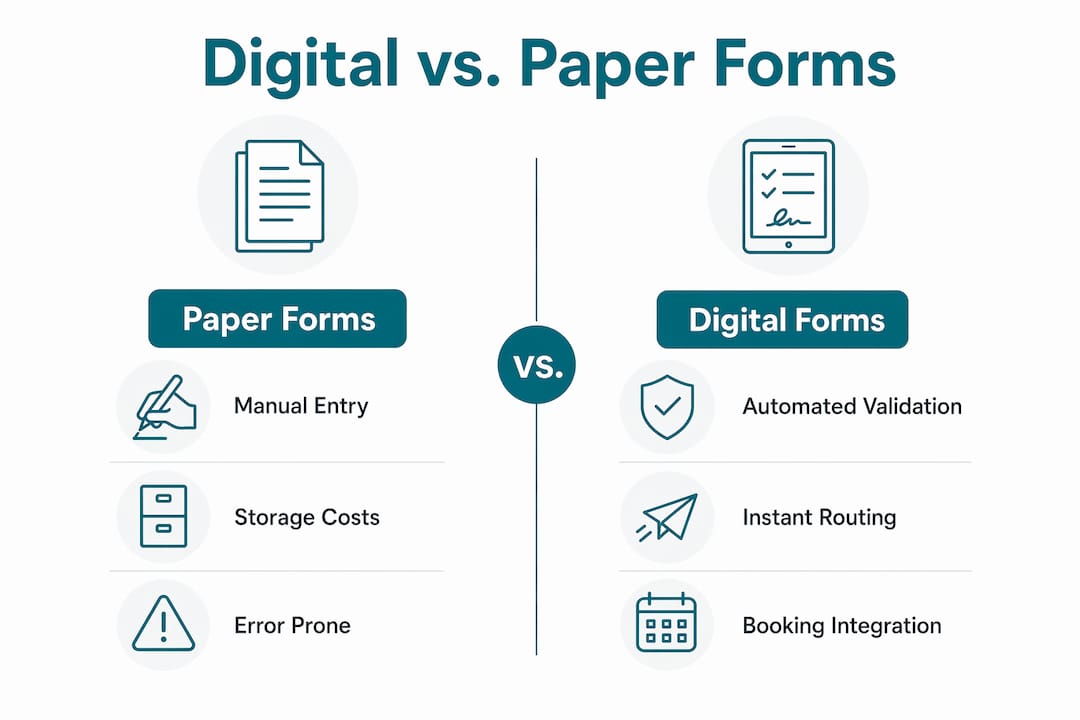
The cost of paper forms goes well beyond the price of printing. Physical forms require storage space, manual distribution, and someone to retrieve and re-enter the data. Each of those steps adds time and introduces error.
| Metric | Paper forms | Digital forms |
|---|---|---|
| Data entry | Manual, prone to transcription errors | Captured directly, no re-entry needed |
| Storage | Physical filing, space and retrieval costs | Cloud-based, searchable instantly |
| Distribution | Hand-delivered or mailed, delays routing | Sent automatically at trigger events |
| Error correction | Staff must chase and correct after the fact | Validation prevents errors at submission |
| Approval routing | Manual handoff, average 3.2 days | Automated routing, average 1.1 days |
| No-show impact | No automated reminders | Multi-touch reminders reduce no-shows 20–30% |
Paper forms cost more than paper. Handling errors, lost time, and physical storage expenses add up across every week of operation. A beauty salon storing five years of paper client records is paying for that space and paying again every time a staff member searches for a file.
Digital forms also give you capabilities paper cannot match. You can export client data to a spreadsheet, search by contraindication type, or pull all clients due for a patch test recheck. None of that is possible with a paper filing cabinet.
The efficiency gap widens when you factor in rework from manual transcription. Every time a staff member copies information from a paper form into a booking system, there is a chance for error. Digital forms eliminate that step entirely.
Practical steps to implement digital forms in your service business
Choosing the right platform is the first decision, and it shapes everything else. Platforms built for service industries, like Getconsentify, include templates designed for beauty salons and tattoo studios. Generic form builders require you to build those structures from scratch.
Intake forms that improve consultations are designed around the specific questions estheticians and tattoo artists need answered before a session. Contraindications, patch test history, skin sensitivity, and design preferences all belong in the form before the client arrives.
- Choose a platform with industry templates. Starting from a blank form wastes time and risks missing critical fields.
- Build validation rules into every form. Required fields, dropdowns, and conditional logic prevent incomplete submissions.
- Connect forms to your booking system. Automatic triggers remove the need for manual sending.
- Set up automated reminders. At least two touchpoints before the appointment reduce no-shows and incomplete forms.
- Track cycle times, not paper saved. Measuring how long it takes from booking to complete intake tells you whether your forms are working.
Tracking approval cycle times and rework rates delivers better insight into your admin efficiency than counting how many forms you printed last month. If your average intake completion time drops from 48 hours to 4 hours, that is a real, measurable improvement.
Pro Tip: Audit your current admin process before switching platforms. Map every manual step from booking to completed intake. Then identify which steps a digital form can eliminate. You will find more than you expect.
Common pitfalls to avoid: skipping validation rules, sending forms without reminders, and failing to connect the form to your client management system. Each of these mistakes recreates the manual work you were trying to eliminate.
Key takeaways
Digital forms reduce admin work most effectively when validation, automated routing, and booking integration work together as a single workflow rather than as isolated tools.
| Point | Details |
|---|---|
| Validation prevents rework | Required fields and conditional logic stop incomplete forms before they reach staff. |
| Automated routing cuts approval time | Workflows reduce approval cycles by 65.6%, from 3.2 days to 1.1 days on average. |
| Pre-registration reduces no-shows | Sending forms at booking with automated reminders cuts no-shows by 20–30%. |
| Paper costs more than it appears | Storage, transcription errors, and retrieval time add hidden costs beyond printing. |
| Measure cycle times, not paper saved | Tracking intake completion time and rework rates shows the real impact of digital forms. |
Why most salons are still solving the wrong problem
I have seen a lot of service business owners switch to digital forms and then wonder why their admin workload barely changed. The reason is almost always the same: they digitized the form but left the workflow manual.
A PDF sent by email is not a digital form. It is a digital piece of paper. The real reduction in admin work comes from embedding validation and automation into the form itself, so the system handles follow-up, routing, and storage without anyone touching it.
The businesses that see the biggest gains treat their forms as the front end of a data pipeline. The form captures the information, validation filters it, automation routes it, and the booking system stores it. Staff only get involved when something genuinely needs human judgment, like a flagged contraindication or a complex design consultation.
My honest advice: stop measuring success by how much paper you eliminated. Measure it by how many times your front desk had to chase a client for missing information last week. If that number is not dropping, your forms are not working hard enough.
— Artur
Getconsentify makes admin reduction practical for beauty pros
Running a salon or tattoo studio means your time belongs with clients, not paperwork. Getconsentify builds digital intake forms for beauty salons with the specific fields, validation rules, and automation that service businesses need. Templates cover everything from patch test history and contraindication disclosures to aftercare acknowledgment and design approvals.
Forms connect directly to your booking workflow, send automatically at the time of booking, and trigger reminders before each appointment. Client data saves to a searchable record with no manual re-entry. Your front desk handles clients. Getconsentify handles the paperwork.
FAQ
What makes digital forms more effective than paper for salons?
Digital forms validate data at entry, route submissions automatically, and connect to booking systems. Paper forms require manual handling at every step, which multiplies errors and staff time.
How do digital forms reduce no-shows in appointment-based businesses?
Automated reminders tied to pre-registration forms reduce no-shows by 20–30%. Clients who complete their intake form before arriving are significantly more likely to keep their appointment.
Are digital forms effective for tattoo studios specifically?
Digital consent forms for tattoo studios capture contraindications, design approvals, and aftercare acknowledgment in one automated workflow. This replaces multiple manual conversations and eliminates incomplete paper records.
How do you measure the impact of digital forms on admin work?
Track approval cycle times and rework rates rather than paper volume. A drop in intake completion time from 48 hours to under 4 hours is a concrete measure of admin reduction.
What is the biggest mistake when switching to digital forms?
Skipping validation rules and failing to connect forms to your booking system. Without those two elements, staff still chase missing data manually, and the admin burden stays the same.