How Mobile Intake Forms Work in Your Salon
Discover how mobile intake forms work in your salon to streamline check-ins, enhance data accuracy, and save valuable time for every appointment.

How Mobile Intake Forms Work in Your Salon

Mobile intake forms are digital questionnaires clients complete on their smartphones before a salon visit to speed up check-in and improve data accuracy. The standard setup, used by platforms like DaySmart and Bella Booking, sends each client a unique form link via SMS or email immediately after booking. No app download. No login. The client taps the link, fills out the form in their browser, and the data attaches directly to their profile in your salon software. Understanding how mobile intake forms work in a salon context means understanding a complete workflow shift, not just a paperwork swap.
Check-ins that once took several minutes now take seconds with pre-completed digital forms. That time savings compounds across every appointment in your day.
How do mobile intake forms work in a salon workflow?
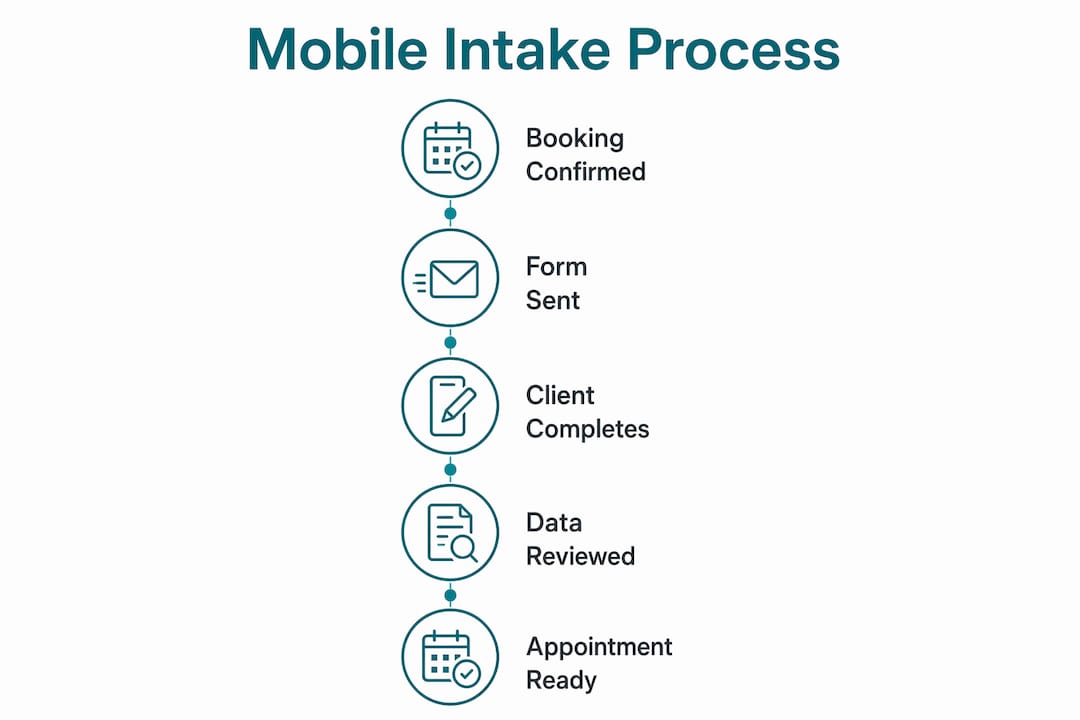
The mobile client intake process starts the moment a booking is confirmed. Your salon software automatically sends a form link to the client’s phone or email. The client opens the link in any mobile browser, answers the questions, and submits. No friction, no account creation required.

Once submitted, the completed form attaches to the client’s appointment record. Your front desk staff and stylists can pull up responses before the client even walks through the door. Platforms like DaySmart describe this as appointment-attached data, meaning stylists see relevant, up-to-date information immediately rather than hunting through static profile notes. That distinction matters for service quality.
The integration goes further than storage. When a form is tied to a specific appointment, your team sees the exact responses relevant to that day’s service. A colorist reviewing a client’s patch test history or contraindications before a color appointment gets that information in context, not buried in a general notes field.
- Clients receive a unique form link via SMS or email after booking
- Forms open in any mobile browser with no app or login required
- Completed responses sync automatically to the client’s profile
- Staff access form data directly from the appointment view
- Service-specific forms display only questions relevant to that day’s treatment
Pro Tip: Set your booking confirmation message to include the form link with a single sentence explaining why you’re asking. “Please complete this short form so your stylist is ready for you” increases completion rates significantly.
Can you configure different forms for different services?
Yes, and you should. Salon digital forms work best when they are built around the specific service being performed. A client booked for a lash extension appointment does not need to answer questions about scalp sensitivity. A skincare client does not need a hair texture assessment. Service-specific form configuration is a standard feature in platforms like Bella Booking and DaySmart, and it directly improves both client experience and staff efficiency.
You also control how often a form appears. Some information, like medical history or known allergies, only needs to be collected once and stored on the client’s profile. Other information, like current skin condition or recent chemical treatments, should be refreshed every visit. Setting forms to appear once versus per-visit is a simple toggle in most intake form software for salons.
Here is how those two approaches compare in practice:
| Form Type | Frequency | Best For |
|---|---|---|
| Medical history and allergy intake | Once per client | Ongoing contraindication tracking |
| Pre-service consultation | Every visit | Hair color, chemical treatments, skincare |
| Consent and waiver | Per service type | Lash extensions, waxing, chemical peels |
| New client profile | First visit only | General onboarding and preferences |
Pro Tip: Build a separate consent form for every chemical or high-risk service you offer. Combining a hair color consent with a general intake form creates confusion. Separate forms mean cleaner records and clearer liability documentation.
What are the best practices for mobile form design?
Form length and mobile usability directly determine whether clients complete your forms or abandon them. Under 10 fields per form is the standard recommendation for mobile intake. Every additional field beyond that increases the risk of drop-off or rushed, inaccurate answers.
Design choices matter just as much as length. Single-column layouts prevent horizontal scrolling on small screens. Large touch targets on buttons and checkboxes reduce input errors. Avoid dropdown menus with more than five options since they frustrate mobile users. These are not cosmetic preferences. They are functional requirements for a form that actually gets completed.
Timing your sends is equally important. Follow this sequence for the highest completion rates:
- Send the form link immediately after the booking is confirmed
- Send a reminder with the link again 24 hours before the appointment
- Include a brief note explaining why each sensitive question is being asked
- Mark only truly necessary fields as required, and leave optional fields clearly labeled
- Keep the form accessible on the confirmation page so clients can return to it easily
The explanation step in item three is underused. When a client sees a question about medications or skin conditions, a one-sentence note like “We ask this to avoid reactions during your treatment” builds trust and increases honest responses. Clients who understand why you’re asking are far more likely to answer accurately.
Intake form personalization also plays a role here. When clients see questions that clearly apply to their specific service, they engage more seriously with the form. Generic questionnaires feel like bureaucracy. Tailored forms feel like preparation.
What happens if a client doesn’t complete the form before arrival?
Incomplete pre-appointment intake is common, especially with first-time clients. The solution is a two-path fallback system that keeps your appointment flow intact regardless of whether the form was finished ahead of time.
On-site backup for form completion is operationally essential. Here is how to build it into your front desk process:
- Keep a dedicated tablet at the reception desk loaded with your intake form portal
- Resend the form link to the client’s phone the moment they check in so they can complete it on their own device
- Sync all responses to the client profile in real time so the stylist receives the data before the service begins
- Build a 10-minute buffer into first-time client appointments to absorb any on-site completion time
- Train front desk staff to resend links without making clients feel penalized for not completing the form earlier
The buffer time recommendation is practical, not punitive. First-time clients often have more questions, more complex service needs, and less familiarity with your process. A 10-minute buffer protects your schedule without rushing the intake. Platforms like SchedulingKit specifically recommend this approach to prevent intake delays from cascading through your day.
What are the legal requirements for digital consent in salons?
Digital consent in salons is not as strictly regulated as healthcare, but the legal principles that protect you are the same. An electronic signature is only enforceable if it is backed by a verifiable audit trail. That means your intake form software must generate automatic, system-level records of when a form was signed, by whom, and what the signer agreed to.
Audit trails must include timestamps, user identity, and the specific consent language the client acknowledged. Manual logs or simple checkboxes without backend records do not meet this standard. Certivo, which documents electronic signature requirements based on FDA 21 CFR Part 11 principles, is clear that audit entries must be computer-generated, not manually created. Salons are not FDA-regulated entities, but these principles represent the enforceability floor for any digital consent system.
The practical implication is straightforward. If a client disputes a service outcome or claims they were not informed of a risk, your timestamped consent record is your defense. A paper form in a filing cabinet is harder to retrieve, easier to lose, and provides no proof of when it was signed.
Consult a licensed attorney in your state to confirm that your digital consent forms meet local enforceability requirements. Laws governing electronic signatures vary by jurisdiction, and a legal review is worth the investment for any salon performing chemical or high-risk services.
Pro Tip: Ask your intake form software provider directly whether their system generates automatic audit trail entries. If they cannot confirm this, your digital signatures may not hold up in a dispute.
For salons that also offer medical aesthetics or spa treatments, the digital consent practices used in medical spas provide a useful benchmark for what thorough consent documentation looks like.
Key takeaways
Mobile intake forms work best when they combine automated pre-send timing, service-specific configuration, mobile-optimized design, and a reliable on-site fallback to capture complete, enforceable client data before every appointment.
| Point | Details |
|---|---|
| Automated form delivery | Send form links immediately after booking and again 24 hours before the appointment. |
| Service-specific configuration | Build separate forms for color, skincare, and chemical services to capture only relevant data. |
| Mobile design standards | Keep forms under 10 fields with single-column layouts and large touch targets. |
| On-site fallback system | Keep a tablet at reception and resend links on arrival to prevent incomplete intake from disrupting flow. |
| Audit trail requirement | Use software that generates automatic, timestamped electronic signature records for every consent form. |
The part most salon owners get wrong about digital forms
I have seen salon owners invest in intake form software and then wonder why their front desk is still chaotic. The technology is not the problem. The setup is.
Most salons configure one generic intake form and send it to every client for every service. That approach creates the same problem as paper forms: irrelevant questions, client frustration, and incomplete answers. The salons that actually see a difference in their appointment flow are the ones that build service-specific forms and set them to trigger automatically based on the booking type.
The second mistake is treating the form as a one-time data collection event. Appointment-attached form data means your stylists see current, relevant information at every visit, not just the first one. A client’s skin sensitivity or medication list can change. Refreshing that data per visit is not redundant. It is responsible practice.
The competitive advantage here is real. Clients who complete a thoughtful, relevant intake form before their appointment arrive feeling prepared and valued. They trust that your team has reviewed their information. That trust is built before they sit in the chair. Salons that still hand clients a clipboard at the door are signaling the opposite.
The legal piece is the one I would not skip. A digital signature without an audit trail is not meaningfully different from no signature at all. Verify that your software logs signing events automatically. If it does not, find one that does.
— Artur
How Getconsentify makes salon intake simple and secure
Getconsentify builds digital intake forms specifically for beauty and wellness professionals. Every form is mobile-optimized, branded to your salon, and configured to send automatically before appointments. Clients complete consent forms, health questionnaires, and service-specific waivers on their phones without any app or login required.
Getconsentify captures electronic signatures with full audit trail support, so every consent record is timestamped and stored securely. You get service-specific templates for color, skincare, lash extensions, and more, all ready to customize. If you are ready to replace clipboards with a system that actually protects your salon and impresses your clients, explore Getconsentify’s beauty salon solutions and see how fast setup can be.
FAQ
What is a mobile intake form for a salon?
A mobile intake form is a digital questionnaire clients complete on their smartphone before a salon appointment. It collects health history, contraindications, and consent information without requiring paper forms or in-person completion.
How do clients receive and complete the form?
Clients receive a unique link via SMS or email after booking and open it in their mobile browser. No app download or account login is required, and completed responses sync automatically to their client profile.
How often should clients fill out intake forms?
Medical history and allergy information is typically collected once and stored on the client profile. Service-specific consent forms and pre-treatment consultations should be completed before each relevant appointment.
Are digital consent forms legally enforceable?
Digital consent forms are enforceable when backed by a system-generated audit trail that records the timestamp, signer identity, and consent language. Consult a licensed attorney in your state to confirm local requirements.
What happens if a client doesn’t complete the form before arriving?
Salon staff can resend the form link at check-in or offer an on-site tablet for immediate completion. Building a 10-minute buffer into first-time client appointments prevents incomplete intake from disrupting your schedule.