How Digital Client Intake Forms Work for Small Businesses (2026 Guide)
A plain-English guide to digital client intake forms for small businesses: how clients fill and sign on their phone, where the data lives, and what it costs.

How Digital Client Forms Work for Service Providers

Digital client forms are online intake tools that let clients enter their personal, health, or service information on any device, with responses automatically stored and routed into your business systems. You skip the clipboard, the manual data entry, and the filing cabinet. The result is a faster, cleaner intake process that works whether you run a med spa, a law firm, a chiropractic clinic, or a photography studio. Understanding how digital client forms work is the first step toward replacing a process that costs you time every single day.
How do digital client forms work?
Digital client intake forms replace paper by moving the entire data collection process online. A client receives a link, opens the form on their phone, tablet, or computer, fills in their details, and submits. The response lands directly in your system, organized and ready to use. No transcription. No lost paperwork.
Platforms like Acuity Scheduling integrate intake forms directly into the booking page, so clients complete them at the moment they schedule. That timing matters. A form completed at booking is far more reliable than one emailed afterward and left unopened. Legal practice software like Clio takes this further: submitted form data auto-creates contacts and notes in the system, saving up to 5 minutes per contact entry. Across a busy week, that adds up fast.

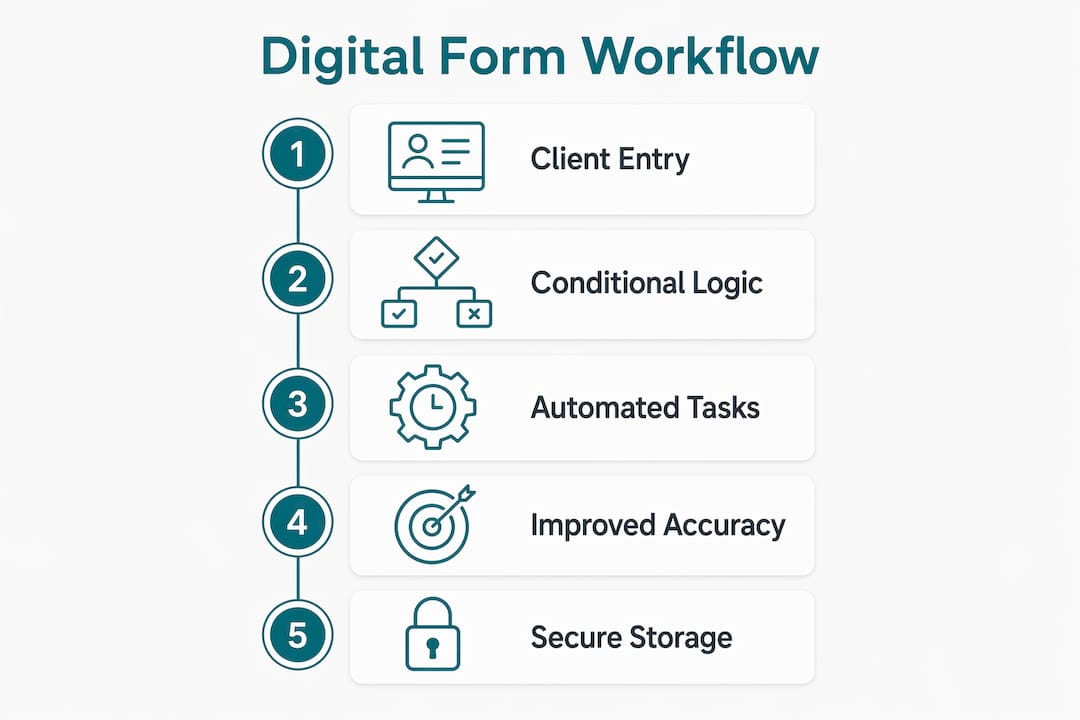
The underlying technology is straightforward. Forms use conditional logic to show or hide fields based on previous answers. A client who selects “yes” to a skin condition sees a follow-up field about contraindications. A client who selects “no” skips it entirely. This keeps forms concise and relevant, which directly improves completion rates.
How do digital client forms improve intake workflows?
The biggest workflow gain is simple: clients do the data entry, not your staff. Your front desk stops retyping handwritten notes and starts focusing on the actual appointment. That shift alone reduces transcription errors and frees up meaningful time each day.
The workflow improvements go deeper than data entry. A well-designed intake workflow includes form submission, automated confirmations, scheduling, document collection, e-signatures, payments, and project setup, all connected. Each step triggers the next automatically. You set it up once, and it runs without manual intervention.
Key workflow benefits include:
- Automated data routing: Responses flow directly into your CRM, practice software, or project management tool without copy-paste.
- Pre-appointment delivery: Forms sent before appointments by email or SMS boost completion rates and give you time to review client details before the session starts.
- Booking-flow embedding: Attaching forms to the booking confirmation, as Acuity Scheduling does, means clients complete intake while the appointment is fresh in their mind.
- Reduced no-shows and gaps: Clients who complete intake forms are more invested in their appointment and less likely to cancel without notice.
Tools like ClickUp Forms go a step further. Form submissions become tasks inside project workflows automatically, eliminating the spreadsheet backlog that plagues manual intake processes.
Pro Tip: Link your intake form directly to your booking confirmation page rather than sending it as a separate email. Embedded forms see significantly higher completion rates than follow-up emails, which often get filtered or ignored.
What are the key benefits of digital forms compared to paper?
Paper forms have one advantage: no setup required. Every other advantage belongs to digital. The comparison is not close.
Digital forms use automatic data validation and conditional logic to improve accuracy and reduce incomplete or confusing client information. Paper forms cannot validate anything. A client can write illegibly, skip required fields, or leave contradictory answers, and you only discover the problem when you try to use the data.
Here is how the two approaches compare across the factors that matter most to service providers:
| Feature | Paper forms | Digital forms |
|---|---|---|
| Data accuracy | Prone to handwriting errors and skipped fields | Validated in real time; required fields enforced |
| Completion timing | At the front desk, under time pressure | Before the appointment, at the client’s convenience |
| Storage and retrieval | Physical filing; risk of loss or damage | Cloud-stored; searchable and accessible instantly |
| Editing and updates | Requires a new form or messy corrections | Client edits via a secure link; version history maintained |
| Compliance and audit trails | Difficult to verify authenticity | Timestamped, IP-logged, and e-signature ready |
| Staff time per client | 3–5 minutes of manual data entry | Near zero after initial setup |
Beyond accuracy, digital forms give clients a better experience. Completing a form on their phone before arriving feels modern and respectful of their time. Arriving to find a clipboard waiting for them feels like 2005.
Additional benefits worth noting:
- No lost forms. A paper form left in a jacket pocket or dropped in a waiting room is gone. A digital submission is permanent.
- Easy updates. If a client’s health history changes, you send them a link to update their record. No new form, no re-filing.
- Branded presentation. Your forms can carry your logo, colors, and tone, reinforcing your brand at the first point of contact.
How do digital client forms handle privacy and compliance?
Compliance is the question most service providers ask first, and the answer is reassuring. HIPAA does not prohibit electronic signatures but requires authentication, audit trails, and secure storage to protect electronic protected health information (ePHI). The standard is technology-neutral, meaning the law cares about data integrity and security, not which software you use.
What that means practically: your digital form platform must provide authentication (confirming who signed), non-repudiation (proof the signer cannot deny signing), and a secure audit trail. Platforms built for healthcare and wellness environments, including Getconsentify, build these safeguards in by default. You do not need to configure them manually.
For non-healthcare businesses, the compliance bar is lower but still real. Consent forms for photography, beauty services, or legal consultations need to be legally binding. A timestamped e-signature with an IP record satisfies that requirement in most jurisdictions.
Pro Tip: Before selecting a digital form platform, confirm it stores signed documents with a full audit trail and offers encrypted data storage. Ask specifically whether the platform is HIPAA-compliant if you collect any health-related information, including skin conditions, allergies, or medical history.
How can businesses implement digital client forms effectively?
Implementation is where most businesses either get it right or create a new kind of friction. The goal is a form that clients complete quickly and that feeds your systems cleanly.
Follow these steps to set up digital client intake forms that actually work:
- Choose the right platform. Match your platform to your workflow. Typeform works well for simple, conversational forms. ClickUp Forms suits teams that manage work in ClickUp. Getconsentify is built specifically for beauty, wellness, and clinical providers who need branded consent forms with e-signatures and compliance built in.
- Use conditional logic. Show clients only the fields relevant to them. An esthetician’s form should ask about skin conditions and current medications. A photographer’s form should ask about image usage rights. Conditional logic keeps the form short and relevant, which improves completion.
- Embed forms in your booking flow. Embedding intake forms in the booking process is more reliable than sending them separately. Clients complete the form while they are already engaged with your booking page.
- Automate data syncing. Connect your form platform to your CRM or practice software. Avoid any step that requires manual copy-paste. Every manual step is a potential error and a time cost.
- Test the client experience. Complete your own form on a phone before you launch it. Check that required fields are clear, the form loads quickly, and the submission confirmation is reassuring.
Pro Tip: Keep your intake form under 10 questions for first-time clients. You can collect additional detail at follow-up appointments. A shorter form gets completed. A long form gets abandoned.
Key takeaways
Digital client forms replace paper intake with automated, device-friendly submissions that feed directly into your business systems, cutting staff data entry and improving data accuracy from the first client interaction.
| Point | Details |
|---|---|
| Embed forms at booking | Attach forms to the booking confirmation page, not a separate email, for the highest completion rates. |
| Automate data routing | Connect form submissions to your CRM or practice software to eliminate manual data entry entirely. |
| Use conditional logic | Show only relevant fields to each client to keep forms short and completion rates high. |
| Confirm compliance features | Choose a platform with audit trails, e-signature authentication, and encrypted storage before collecting health data. |
| Test on mobile first | Most clients complete forms on their phones, so verify the mobile experience before going live. |
Why the form is your first impression, not just a formality
I have seen businesses spend months refining their service delivery and then hand new clients a generic PDF to print and sign. That disconnect is more damaging than most owners realize. The intake form is not administrative overhead. It is the first interaction your client has with your brand after booking.
The businesses that get the most out of digital intake are the ones that treat the form as part of the client experience, not a checkbox before the real work starts. A well-branded, concise form that arrives automatically after booking signals professionalism before the client walks through your door. It also gives you information you can act on. Knowing a client has a latex allergy or a specific skin sensitivity before they arrive changes how you prepare, and clients notice that preparation.
The common pitfall I see is over-engineering the form at launch. Businesses add every possible question, then wonder why completion rates are low. Start with the minimum viable intake: name, contact, key health or service questions, and consent. You can always add fields later. You cannot undo a form that trained clients to ignore your intake requests.
The future of digital intake is moving toward AI-assisted pre-screening, where forms adapt in real time based on client responses and flag contraindications automatically. That shift is already happening in clinical and aesthetic medicine. For most service providers, the immediate opportunity is simpler: replace paper with a digital form that works on a phone, connects to your calendar, and stores responses securely. That alone puts you ahead of the majority of your competitors.
— Artur
Getconsentify makes digital client intake simple
Running a beauty salon, med spa, chiropractic clinic, or photography business means your time belongs to your clients, not to paperwork. Getconsentify builds branded digital intake and consent forms designed specifically for service providers who need compliance, speed, and a polished client experience from the first touchpoint.
Every form includes e-signature support, encrypted storage, and audit trails that meet HIPAA requirements. You can embed forms in your booking flow, send them via SMS or email before appointments, and have responses waiting in your system before the client arrives. Getconsentify covers beauty and wellness providers, chiropractic clinics, and photography businesses with industry-specific form templates ready to customize. See how Getconsentify fits your practice.
FAQ
What is a digital client intake form?
A digital client intake form is an online form that collects client information before or at the time of a service appointment. Clients complete it on any device, and responses are stored automatically in the business’s system.
Are digital intake forms legally binding?
Digital intake forms with e-signatures are legally binding when the platform provides authentication, a timestamped audit trail, and encrypted storage. HIPAA-compliant platforms meet these requirements for health-related consent.
How do I send a digital intake form to clients before their appointment?
You can send intake forms before appointments by embedding them in your booking confirmation page or sending a direct link via email or SMS. Embedding in the booking flow produces the most reliable completion rates.
What makes digital forms better for client data accuracy?
Digital forms validate data in real time, enforce required fields, and use conditional logic to show only relevant questions. Paper forms cannot prevent skipped fields or illegible handwriting.
Can small businesses use digital client forms without technical skills?
Platforms like Getconsentify and Typeform are built for non-technical users, with drag-and-drop form builders, pre-built templates, and booking integrations that require no coding to set up.