How Electronic Signatures Work on Waivers for Business
Discover how electronic signatures work on waivers to protect your business. Improve client compliance and speed up onboarding today!

How Electronic Signatures Work on Waivers for Business

An electronic signature is a legally recognized digital equivalent of a handwritten signature, and understanding how electronic signatures work on waivers is the fastest way to protect your business and improve client compliance. Under the U.S. ESIGN Act and the Uniform Electronic Transactions Act (UETA), a properly executed electronic waiver carries the same legal weight as a paper document signed in ink. Platforms like Getconsentify, DocuSign, and Adobe Acrobat Sign have made this process accessible to businesses of every size. The result is faster client onboarding, fewer lost documents, and a stronger legal record when disputes arise.
How do electronic signature waivers meet legal requirements?
Electronic signatures under the ESIGN Act and UETA are legally equivalent to handwritten signatures when four core pillars are satisfied. Miss any one of them and your waiver may not hold up in court.
The four legal requirements are:
- Intent to sign. The signer must take a deliberate action, such as typing a name, drawing a signature, or clicking an “I Agree” button. Passive scrolling does not count.
- Consent to electronic records. The signer must agree, explicitly, to conduct business electronically. A brief disclosure statement at the top of your waiver satisfies this requirement.
- Association with the document. The signature must be logically linked to the specific waiver text. The platform must attach the signature data directly to that document, not to a separate file.
- Verifiable record retention. You must be able to produce a complete, unaltered copy of the signed waiver at any time. This means secure, time-stamped storage.
These same four pillars apply beyond U.S. borders. Canada’s PIPEDA and provincial electronic commerce laws mirror the ESIGN framework closely. The European Union’s eIDAS Regulation establishes three tiers of electronic signatures, with the standard electronic signature tier covering most commercial waivers. If your clients include international visitors, knowing which tier applies to your document type keeps you covered.
Key legal principle: A waiver signed electronically is only as strong as the platform that created it. The platform’s audit trail, not the visual appearance of the signature, determines legal defensibility.
How does the electronic signature process work step by step?
The signing process takes less than 60 seconds on a mobile device. That speed is not just convenient. It directly increases the percentage of clients who complete waivers before their appointment or service begins.
Here is exactly how the process works from start to finish:
- You prepare the document. Upload your waiver to your chosen platform and place signature fields, date fields, and any required initials. Most platforms let you save templates so you never repeat this step.
- You send the waiver. The client receives a secure link via email, SMS, or a QR code displayed at your front desk or on your booking confirmation page.
- The client signs. They open the link on any device, read the full waiver text, and apply their signature by typing their name, drawing with a finger, or clicking a designated button.
- The platform builds the audit trail. Every action is logged automatically: timestamp, IP address, device type, and browser. This data is cryptographically sealed to the document.
- The document is finalized and stored. Both parties receive a copy. The signed waiver is stored in a tamper-evident record that you can retrieve at any time.
Pro Tip: Set up your waiver link inside your booking confirmation email. Clients sign before they arrive, which eliminates front-desk delays and removes the awkward moment of asking someone to read legal text while standing at a counter.
The audit trail created in step four is where electronic waivers outperform paper. Audit trails capturing timestamp, IP address, and authentication details create a cryptographically secure record. A paper waiver can be disputed on the grounds that the signature was forged or the client never saw the full text. A properly generated digital audit trail makes those arguments extremely difficult to sustain.
What makes a digital waiver legally defensible?
Knowing the process is one thing. Building a waiver that actually holds up is another. Several subtle but critical factors separate a strong digital waiver from a weak one.
Digital waivers must present the full text conspicuously and require affirmative consent. Pre-checked boxes or text hidden behind a hyperlink weaken enforceability significantly. Courts have repeatedly found that a signer cannot meaningfully consent to terms they were not shown.
Here is what strong waiver design looks like in practice:
- Full text on screen. The entire waiver must be readable without clicking away to another page. Scrollable text within the signing interface is acceptable. A link that says “click here to read the terms” is not.
- Affirmative action required. The client must do something deliberate: sign, type, or click. No pre-checked consent boxes.
- Immutable storage. Platforms with immutable record storage and access controls prevent unauthorized tampering after signing. Choose a platform that explicitly offers this feature.
- Consistent document versioning. If you update your waiver, clients who signed the previous version should remain linked to the version they actually agreed to.
The visual style of an e-signature is less important legally than the secure audit trail and identity verification generated by the platform. A simple typed name backed by a complete audit log is more defensible than an elaborate drawn signature with no supporting data.
Pro Tip: Have your waiver reviewed by a local attorney before you go live. A 30-minute legal consultation costs far less than defending a claim based on a poorly worded consent clause.
Electronic vs. paper waivers: which is better for your business?
The practical differences between electronic and paper waivers matter more than most business owners realize. Here is a direct comparison across the factors that affect your daily operations and legal exposure.
| Factor | Electronic waivers | Paper waivers |
|---|---|---|
| Signing speed | Under 60 seconds on mobile | 2–5 minutes at minimum |
| Storage and retrieval | Instant, searchable, cloud-based | Manual filing, risk of loss |
| Audit trail | Automatic, cryptographically sealed | None |
| Cost over time | Low (platform subscription) | Ongoing printing and storage costs |
| Enforceability | Strong with proper platform | Moderate, vulnerable to forgery claims |
| Client experience | Convenient, can sign before arrival | Requires physical presence |
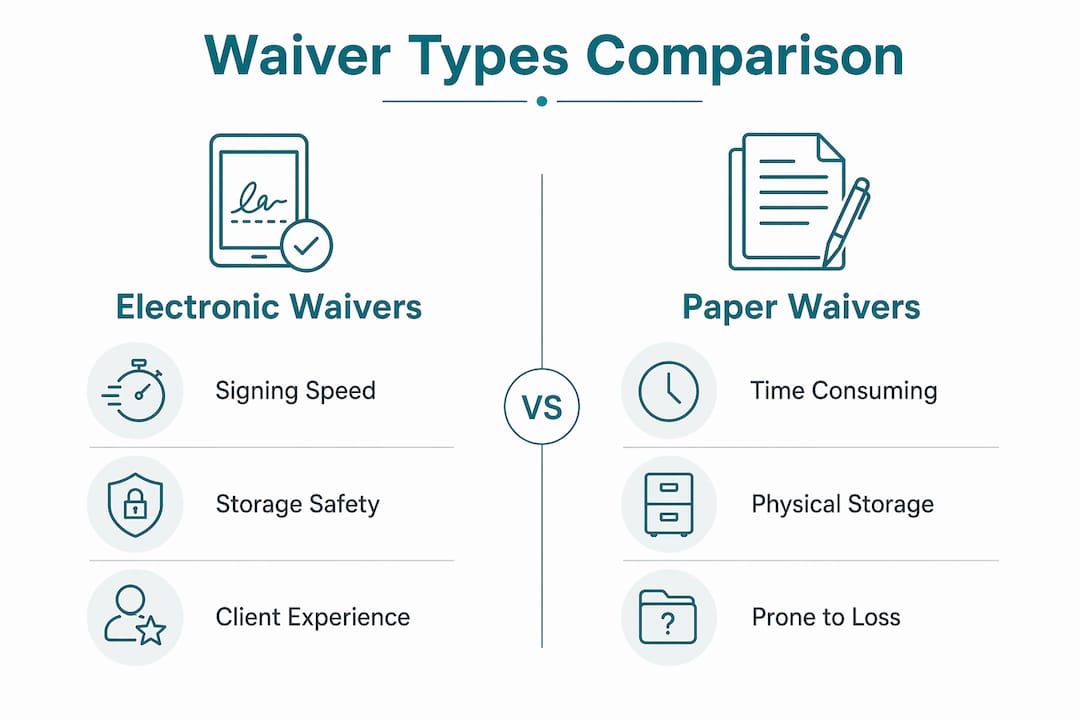
Electronic waivers reduce administrative burdens such as filing and loss risks while improving client experience compared to paper. That combination of lower overhead and stronger legal protection is why salons, chiropractic offices, photography studios, and rental businesses have moved away from paper almost entirely.
The one honest limitation of electronic waivers is technical failure. A client without a smartphone, a location with poor connectivity, or a platform outage can disrupt your workflow. The fix is simple: keep a tablet at your front desk as a backup signing station and have a contingency plan for connectivity issues.
How do you implement electronic waivers into your existing workflow?
Getting the technology right is only half the job. The other half is making the process feel natural for your clients and your staff.
Integrating electronic waivers into booking or check-in flows using QR codes, SMS, or email links is the most effective approach for maintaining workflow efficiency. Here is a practical setup that works across industries:
- Attach the waiver to your booking confirmation. Every client who books online receives the waiver link automatically. Most will sign before they arrive.
- Display a QR code at your front desk. Walk-in clients or those who did not sign in advance can scan and complete the waiver on their own phone in under a minute.
- Keep a tablet available. For clients without smartphones or those who prefer guided assistance, a front-desk tablet with the waiver pre-loaded removes any friction.
- Train your staff on refusal protocols. Customers who refuse to sign should be handled the same way as with paper waivers: services may be withheld until consent is given. Staff should communicate this calmly and consistently.
- Review your audit logs monthly. Spot-check completed waivers to confirm the platform is capturing all required data fields. Catching a configuration issue early is far better than discovering it during a dispute.
For beauty salons, the digital consent workflow fits naturally into pre-appointment communications, where clients already expect to receive booking reminders and preparation instructions. For chiropractic offices, patient intake waivers can be sent 24 hours before the first appointment, giving patients time to read carefully and reducing chair-side paperwork. Photographers can send model release forms and liability waivers as part of the pre-shoot briefing package.
Key takeaways
Electronic waiver enforceability depends on four legal pillars, a complete audit trail, and deliberate platform selection. Businesses that get all three right reduce disputes and speed up client intake significantly.
| Point | Details |
|---|---|
| Legal equivalence | ESIGN Act and UETA make electronic waivers as binding as paper when four criteria are met. |
| Audit trail is the proof | Timestamps, IP addresses, and sealed records make digital waivers more defensible than paper. |
| Presentation matters | Full waiver text must be visible and affirmative consent required. Pre-checked boxes weaken enforceability. |
| Speed drives compliance | Signing takes under 60 seconds on mobile. Sending waivers before arrival increases completion rates. |
| Platform choice is critical | Immutable storage and access controls are non-negotiable features for any waiver platform you select. |
Why I think most businesses underestimate their waiver risk
I have seen businesses invest heavily in their client experience and almost nothing in their consent documentation. A beautifully designed salon or a well-equipped chiropractic office can have its reputation and finances threatened by a single disputed service if the waiver process is weak.
The shift to electronic waivers is not just about convenience. It is about building a defensible record of every client interaction. Paper waivers get lost, get wet, and get disputed. A properly configured digital waiver with a complete audit trail is almost impossible to challenge on procedural grounds.
What I find most interesting is how many business owners still treat the waiver as a formality rather than a legal instrument. The waiver is the document a judge or insurance adjuster will look at first if something goes wrong. Its quality matters enormously.
My honest recommendation: do not choose a waiver platform based on price alone. Choose it based on audit trail quality, storage security, and compliance documentation support for your specific industry. A platform that saves you $20 a month but cannot produce a clean audit log in a legal dispute is not saving you anything.
The businesses I have seen handle disputes most effectively are the ones that can pull up a signed waiver within seconds, complete with the client’s IP address, the exact time they signed, and a sealed copy of the document version they agreed to. That level of documentation changes the entire dynamic of a dispute.
— Artur
How Getconsentify makes electronic waiver signing simple
Getconsentify is built specifically for beauty and wellness professionals, chiropractors, photographers, and service businesses that need reliable, legally defensible digital waivers without the complexity of enterprise software. Every waiver collected through Getconsentify includes a complete audit trail, immutable document storage, and ESIGN Act-compliant consent flows. You can send waivers via SMS, email, or QR code and have signed documents stored and searchable within seconds of completion. Whether you run a beauty salon, a medical spa, or a photography studio, Getconsentify fits directly into your existing booking workflow. Start collecting waivers the right way today.
FAQ
Are electronic signatures on waivers legally binding?
Yes. Under the U.S. ESIGN Act and UETA, electronic signatures are legally equivalent to handwritten signatures when intent, consent, document association, and record retention requirements are met. Most commercial waivers qualify fully.
What documents cannot use electronic signatures?
Electronic signatures are not valid for wills, certain notarized documents, and specific real estate transactions. Always verify document type before relying on an e-signature for legal compliance.
What is the difference between an electronic signature and a digital signature?
An electronic signature is any electronic mark indicating consent, such as a typed name or a click. A digital signature is a specific type of electronic signature that uses cryptographic technology to verify identity and document integrity. Both are legally valid for waivers in most jurisdictions.
How long does it take a client to sign an electronic waiver?
The process takes under 60 seconds on a mobile device. Sending the waiver link before the appointment means most clients arrive already signed, eliminating front-desk delays entirely.
What should I look for in an electronic waiver platform?
Prioritize platforms that offer immutable document storage, complete audit trails with timestamps and IP addresses, and affirmative consent flows. These features determine whether your waiver holds up if a dispute ever reaches a legal proceeding.