Why Intake Forms Prevent Service Errors for Owners
Discover why intake forms prevent service errors and enhance your business efficiency. Streamline client data collection for flawless service delivery!

Why Intake Forms Prevent Service Errors for Owners

Intake forms are structured data collection tools that prevent service errors by capturing complete, validated client information before any service begins. Without them, your staff fills gaps from memory, misreads handwritten notes, and makes assumptions that turn into costly mistakes. This is why intake forms prevent service errors at the source rather than after the damage is done. Whether you run a med spa, a tattoo studio, or a wellness clinic, the quality of your intake process directly determines the quality of your service delivery. Get it right upfront, and nearly every downstream error becomes avoidable.
Why intake forms prevent service errors in your business
Intake forms work because they replace guesswork with structured data. When a client fills out a form before their appointment, you capture contraindications, allergies, treatment history, and consent in a consistent format every time. Structured intake forms with required fields reduce guesswork, incomplete submissions, and first-pass errors. That consistency is what makes the difference between a confident esthetician and one who has to stop mid-treatment to ask basic questions.
The numbers behind this are striking. Electronic forms reduce entry error rates from 32% on paper down to 1% with digital systems. That is a 97% reduction in data entry errors, which means fewer wrong treatments, fewer billing disputes, and fewer liability incidents. For a beauty or wellness business, one error avoided per week can protect both your reputation and your revenue.

The mechanism is straightforward. Paper forms rely on legible handwriting, manual transcription, and staff interpretation. Digital intake forms with validation rules enforce required fields, flag incomplete entries, and reject incorrect data formats before submission. This removes the human error layer that paper introduces at every step.
Pro Tip: Validation rules are only as good as the fields you design. Build your form around the specific service you offer. A lash technician needs different fields than a massage therapist. Generic forms create generic errors.
How do intake forms reduce errors: the mechanics explained
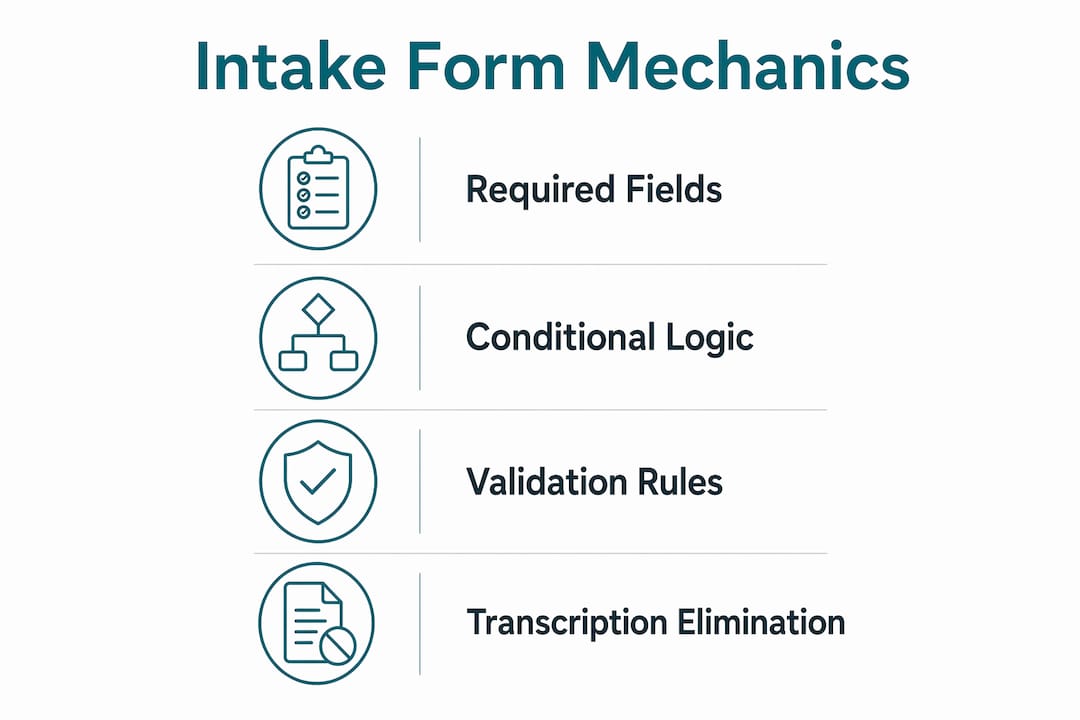
The error-reduction power of intake forms comes from four specific mechanisms that work together.
1. Required field enforcement Digital forms block submission until all critical fields are complete. A client cannot skip their allergy history or leave the consent checkbox unchecked. This is something paper forms cannot enforce without a staff member reviewing every submission manually.
2. Data validation and conditional logic Well-designed digital forms use conditional logic to show or hide fields based on previous answers. If a client selects “yes” to a skin condition, the form automatically surfaces follow-up questions about medications or contraindications. This targeted questioning produces more accurate data than a static list of questions every client sees regardless of relevance.
3. Elimination of transcription errors Incomplete intake forms require staff to fill gaps from memory, which increases error likelihood in service documentation. When data flows directly from the client’s submission into your service record, that transcription step disappears entirely. No retyping. No misreading. No lost paper forms.
4. Direct system integration Digital intake reduces friction only when data feeds directly into existing systems. Otherwise, manual transcription errors persist even with digital forms. Integration is not optional. It is the mechanism that makes the error reduction real.
Here is what these four mechanisms protect against in practice:
- Treating a client with a known contraindication because the allergy field was left blank
- Billing for the wrong service because the intake captured the wrong treatment type
- Repeating a patch test because the previous result was never recorded properly
- Missing a consent signature because the paper form was filed incorrectly
Pro Tip: Before you launch any digital intake form, map the exact path your data takes from submission to service record. If any step involves a human copying information from one system to another, that step is your next error source.
What mistakes undermine intake forms’ error-prevention benefits?
Most service businesses that still experience errors after adopting digital intake forms make one of these five mistakes.
-
Using a generic form for every service. A single intake form that covers every treatment you offer will be bloated, confusing, and full of irrelevant questions. Clients rush through sections that don’t apply to them and miss the ones that do. Customize your form for each service type so every question has a purpose.
-
Skipping system integration. Collecting data digitally but printing it out or manually entering it into your booking software defeats the purpose. The biggest error source in service businesses is not the form itself but the manual data handoff. Integration that enables direct write-back to operational systems is what minimizes errors.
-
Creating a poor client experience. Nearly 1 in 5 patients admitted to providing inaccurate or incomplete information when intake felt rushed or repetitive. If your form is long, confusing, or asks the same question twice, your clients will rush through it. Rushed responses produce inaccurate data. Inaccurate data produces service errors.
-
Ignoring edge cases in staff training. What happens when a client submits a form after the appointment starts? What if the integration fails and data doesn’t sync? Staff training on intake system failure scenarios is critical for maintaining workflow and preventing errors when the system behaves unexpectedly.
-
Treating the form as a one-time setup. Service menus change. Regulations update. New contraindications emerge. A form that was accurate when you built it may be creating errors six months later if you haven’t reviewed it. Schedule a quarterly review of every intake form you use.
Pro Tip: Ask your front desk staff which questions clients most often ask for clarification on. Those are your form’s weak spots. Rewrite them before they cause another error.
How to design intake forms that actually prevent errors
The difference between an intake form that prevents errors and one that creates them comes down to design decisions made before the first client ever sees it.
Keep it complete but focused. Ask only what you will act on. Every question that doesn’t inform a service decision is a question that dilutes client attention and increases the chance of rushed, inaccurate answers. If you don’t use the answer, remove the question.
Use required fields strategically. Not every field needs to be required. Mark as required only the fields where a missing answer would change how you deliver the service. Allergy history: required. Preferred appointment time: optional. Over-requiring fields frustrates clients and leads to false entries.
Build in conditional logic. Show follow-up questions only when they’re relevant. A client who answers “no” to previous laser treatments doesn’t need to see questions about laser-specific contraindications. Conditional logic keeps the form short for most clients while capturing depth when it matters.
Here is a side-by-side comparison of what separates high-performing intake forms from error-prone ones:
| Feature | Error-prone form | Error-preventing form |
|---|---|---|
| Field design | Generic fields for all services | Service-specific fields with conditional logic |
| Required fields | All or none | Only fields that change service delivery |
| Data destination | Printed or manually re-entered | Directly integrated into service records |
| Client experience | Long, repetitive, confusing | Concise, clear, mobile-friendly |
| Staff training | None on failure scenarios | Regular training on edge cases and exceptions |
Pro Tip: Send your intake form to a client who has never seen it and ask them to complete it while you watch. You will immediately see which questions confuse them, which they skip, and where the experience breaks down.
What other benefits do effective intake forms offer service businesses?
Error prevention is the primary reason to invest in quality intake forms, but the operational benefits extend well beyond accuracy.
Logic-driven intake forms that validate and route data reduce administrative tasks by up to 60%. That is time your staff reclaims from chasing missing information, following up on incomplete submissions, and manually entering data into booking systems. For a small service business, that recovered time translates directly into more appointments served and less staff burnout.
Informal intake methods cause incomplete or inconsistent data, leading to clarifications and service delays. Structured intake eliminates that back-and-forth. When a client arrives and their information is already complete and verified, your team can focus on delivering the service rather than gathering data at the chair.
Structured intake data also supports compliance and audit readiness. When a client dispute arises or a regulatory inspection occurs, a complete digital record with timestamps and consent signatures is your best protection. Paper forms stored in filing cabinets don’t offer the same reliability or searchability.
Beyond operations, well-designed intake forms improve client trust. When clients see a professional, branded form that asks precise, relevant questions, they perceive your business as organized and safety-conscious. That perception directly influences satisfaction scores and repeat bookings. Clarity at intake signals competence throughout the service.
Why I think most businesses are solving the wrong intake problem
When service business owners tell me their intake forms aren’t reducing errors, the first thing I ask is where their data goes after submission. Nine times out of ten, the answer reveals the real problem. Someone is still manually copying information from the form into the booking system, the treatment record, or the billing software. The form is digital. The workflow is not.
I’ve seen salons invest in beautifully designed intake forms and still experience the same error rates they had with paper. The form looked premium. The integration was missing. Digitizing the form without redesigning the workflow is like replacing a leaky pipe with a new one and leaving the hole in the wall open.
The other pattern I see consistently is businesses that shorten their forms to improve completion rates without thinking through the consequences. Shortening forms without workflow redesign and training on failure modes leads to error spikes. You can’t remove the contraindication question because it feels like too much to ask. That question exists because the answer changes what you do.
My honest advice: treat your intake form as a clinical tool, not an administrative one. Design it with the same rigor you’d apply to your service protocol. Test it. Train your staff on it. Review it quarterly. And make sure every answer it collects actually reaches the person delivering the service before they begin.
— Artur
How Getconsentify helps you eliminate intake errors
Getconsentify is built specifically for beauty and wellness professionals who need digital intake forms that do more than collect signatures. The platform captures client health history, contraindications, consent, and treatment preferences in branded, mobile-friendly forms that feed directly into your service records. No printing. No manual entry. No gaps in your client data.
With Getconsentify, you get required field enforcement, conditional logic, and automated follow-ups for incomplete submissions. Every form submission is timestamped and stored securely, giving you audit-ready records for every client interaction. If you’re ready to reduce service errors and improve client confidence, start with Getconsentify and see the difference structured intake makes from day one.
FAQ
Why are intake forms essential for preventing service errors?
Intake forms capture complete, validated client information before a service begins, removing the guesswork and memory-reliance that cause errors. Electronic forms reduce data entry error rates from 32% on paper to 1% digitally.
How do intake forms improve service quality?
Structured intake forms give your staff accurate, complete information at the point of service, so they can deliver treatments confidently without stopping to clarify missing details. This consistency directly improves service quality and client satisfaction.
What happens when intake forms aren’t integrated with your systems?
When intake data isn’t fed directly into your operational systems, staff must manually transcribe it, which reintroduces the transcription errors digital forms are designed to eliminate. Integration is what makes the error reduction real.
How does client experience affect intake form accuracy?
Nearly 1 in 5 clients provide inaccurate or incomplete information when intake feels rushed or repetitive. A clear, concise, and well-designed form produces more accurate data and fewer downstream service errors.
How often should you update your intake forms?
Review every intake form at least quarterly to account for changes in your service menu, updated contraindication guidelines, or new regulatory requirements. An outdated form can create the same errors as no form at all.
Key takeaways
Intake forms prevent service errors by capturing complete, validated, and integrated client data before any service begins, making guesswork and transcription errors structurally impossible.
| Point | Details |
|---|---|
| Digital forms cut error rates | Electronic intake reduces data entry errors from 32% on paper to just 1%. |
| Integration is non-negotiable | Data must flow directly into service records or manual transcription errors persist. |
| Client experience drives accuracy | Rushed or repetitive forms cause nearly 1 in 5 clients to submit inaccurate information. |
| Form design determines outcomes | Service-specific fields, required validation, and conditional logic prevent errors at the source. |
| Benefits extend beyond accuracy | Well-designed intake reduces administrative tasks by up to 60% and improves compliance readiness. |